Switching models
Switching models
Section titled “Switching models”Ptah lets you change provider and model at any point in a conversation. The selector sits in the chat header — click it, pick a new model, and the next message uses the new one. The existing transcript is preserved in full.
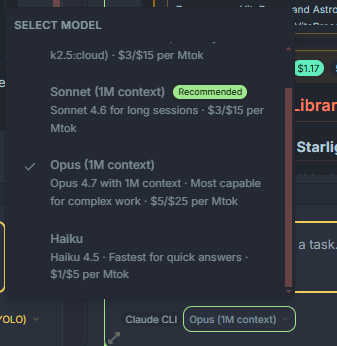
What the selector shows
Section titled “What the selector shows”- The currently active provider (Claude, Copilot, Codex, Ollama, OpenRouter, ptah-cli, etc.).
- The currently active model.
- Live availability — providers that aren’t configured or are offline are greyed out with an inline reason.
- A search box for filtering large catalogs (OpenRouter exposes hundreds of models).
What carries over when you switch
Section titled “What carries over when you switch”| State | Carries over? | Notes |
|---|---|---|
| Message history | Yes | The full transcript is replayed to the new model. |
| File attachments | Yes | Stored as part of each message. |
| Thinking blocks | Provider-dependent | Dropped if the target model doesn’t support them. |
| Tool results | Yes | Tool-call and tool-result pairs are preserved. |
| Prompt cache | No | Caches are provider-specific; the new provider starts cold. |
| Sub-agents already running | Yes | They finish under the provider they were spawned with. |
Switching because of errors
Section titled “Switching because of errors”If a provider returns a hard error (rate limit, auth failure, missing model), Ptah surfaces an inline banner with a Switch provider action that opens the selector pre-filtered to healthy options. Your draft message and attachments stay intact.
Per-workspace defaults
Section titled “Per-workspace defaults”Your default provider and model per workspace are stored in ~/.ptah/settings.json:
{ "llm.defaultProvider": "claude", "anthropicProviderId": "openrouter"}The in-chat selector overrides these for the current session only. To change defaults permanently, update them from the Providers settings page — see Providers.