CLI Agents
CLI Agents
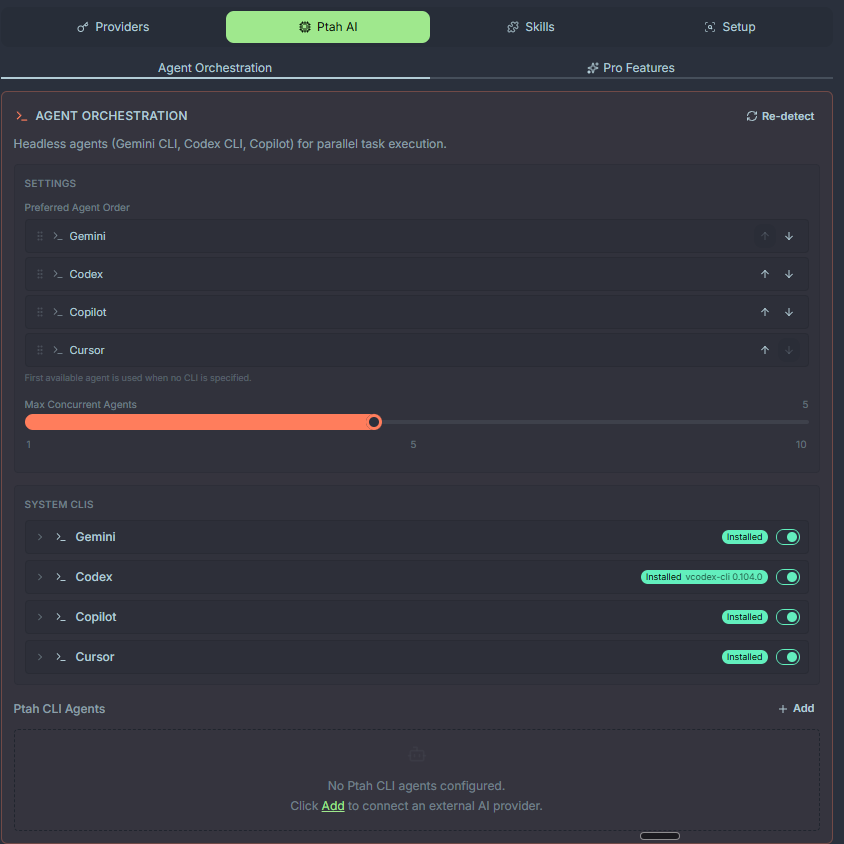
Section titled “CLI Agents”CLI agents are external command-line assistants that Ptah spawns as subprocesses. They complement the built-in orchestra by providing bulk, parallel, or provider-specific horsepower — think of them as extra pairs of hands your main agent can delegate to.
Supported CLIs
Section titled “Supported CLIs”Ptah auto-detects these CLIs on your PATH at startup:
| CLI | Binary | Notes |
|---|---|---|
| ptah-cli | — | Not a binary. A user-configured Anthropic-compatible provider. |
| Codex CLI | codex | OpenAI Codex, SDK adapter |
| Copilot CLI | copilot | GitHub Copilot, SDK adapter |
| Cursor CLI | cursor-agent | Cursor’s agent CLI |
| Antigravity | agy | Antigravity agent CLI |
| OpenCode | opencode | OpenCode agent CLI |
| Pi | pi | Pi agent CLI |
Only the CLIs you have installed are detected. An absent CLI is not an error.
Priority & selection
Section titled “Priority & selection”When a parent agent asks Ptah to “spawn a CLI helper” without specifying which, Ptah picks in this order:
ptah-clicodexcopilot
You can override the default in Settings → CLI Agents → Preferred CLI.
The spawn → poll → read pattern
Section titled “The spawn → poll → read pattern”CLI agents are asynchronous. The orchestrating agent follows a three-step protocol:
1. spawn → launch CLI with a self-contained prompt, get a session_id2. poll → check status until the agent is done or needs input3. read → fetch the final transcript and incorporate resultsThis lets the parent continue working (or spawn more CLIs) while helpers run. The MCP tools that drive this flow are:
ptah_agent_spawn— start a CLI with a promptptah_agent_status— poll for completionptah_agent_read— fetch transcript and resultsptah_agent_steer— send follow-up instructions mid-runptah_agent_stop— cancel a running CLI
Concurrency limits
Section titled “Concurrency limits”To keep your machine responsive, Ptah caps concurrent CLI agents. The cap is
agentOrchestration.maxConcurrentAgents.
| Setting | Value |
|---|---|
| Default | 5 |
| Maximum | 20 |
A spawn beyond the cap fails with a “Maximum concurrent agent limit reached” error. Wait for a running agent to finish, stop one explicitly, or raise the setting. The limit applies across all CLIs combined, not per CLI.
Writing self-contained prompts
Section titled “Writing self-contained prompts”CLI agents don’t share memory with your main chat. Each prompt must include everything the CLI needs:
- File paths (absolute)
- Acceptance criteria
- Output format
Good:
Read D:\projects\app\src\auth\login.ts and refactor the validation blockinto a pure function. Write the result back to the same file.Return a one-line summary when done.Bad:
Refactor the login code we talked about.Session resume
Section titled “Session resume”Long-running CLI tasks can be resumed across Ptah restarts. When you spawn an agent, pass resume_session_id to continue a prior conversation:
{ "cli": "codex", "resume_session_id": "sess_7a2f...", "prompt": "Continue with the test coverage pass we started."}The CLI rehydrates from its own on-disk transcript. Session IDs are displayed in the CLI agents panel.
Using CLI agents from chat
Section titled “Using CLI agents from chat”Ask any senior-tier agent to delegate. For example:
“Spawn three Codex CLI agents in parallel to generate unit tests for
libs/backend/auth,libs/backend/billing, andlibs/backend/users. Merge the results.”
The orchestrator will manage spawn/poll/read and return a consolidated summary.
Inspecting CLI runs
Section titled “Inspecting CLI runs”The CLI Agents panel shows every spawn with:
- Status (running / done / failed / cancelled)
- Duration
- Tokens / cost (when the CLI reports it)
- Session ID (copyable for resume)
- Full transcript
Click any row to open the transcript in a side-by-side diff viewer.
Troubleshooting
Section titled “Troubleshooting”| Symptom | Cause | Fix |
|---|---|---|
CLI not detected on startup | Binary not on PATH | Restart Ptah after installing / add to PATH manually |
ENOENT spawning on Windows | .cmd wrapper issue | Upgrade Ptah — auto-shell routing landed in v1.0 |
| Hanging forever | CLI waiting for interactive input | Stop it; rewrite prompt to be fully non-interactive |
| Mangled colors in output | ANSI codes in transcript | Ptah sets FORCE_COLOR=0 and NO_COLOR=1; ensure no shell profile overrides |