File attachments
File attachments
Section titled “File attachments”Ptah uses a single @ autocomplete — the unified suggestions dropdown — to attach anything in your workspace as context for the next message.
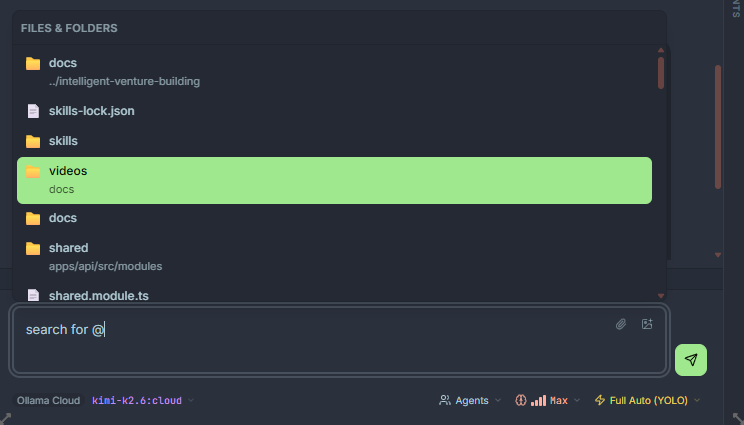
Opening the dropdown
Section titled “Opening the dropdown”Type @ in the composer. The dropdown opens and filters as you type. Results are grouped by type:
| Group | What it is | Typical use |
|---|---|---|
| Files | Any file tracked by the workspace. | Attach source code, config, or docs as context. |
| Folders | Directories in the workspace. | Give the model a whole module or package. |
| Agents | Specialist agents from .claude/agents/ or the built-in catalog. | Delegate work to a domain expert. |
| Skills | Skills from .claude/skills/ or the harness registry. | Pull in procedural knowledge for a task. |
| MCP resources | Anything exposed by a connected MCP server. | Attach live tickets, PRs, or search results. |
Use Arrow keys to move between results and Enter or Tab to insert. Esc closes the dropdown.
How attachments are sent
Section titled “How attachments are sent”- Files are read at send-time and inserted into the prompt as fenced code blocks with the file path as a header. The model sees the current on-disk contents, not a stale snapshot.
- Folders expand to a file tree plus the contents of every text file inside, subject to a size budget. Binary files are skipped.
- Agents become delegation targets — the model can hand a subtask to the agent with
ptah_agent_spawn. - Skills are injected as procedural context at the top of the system prompt.
Drag and drop
Section titled “Drag and drop”You can drop files from your OS file manager directly onto the composer. They are attached the same way as @-mentions. Images (.png, .jpg, .gif, .webp) are sent inline to vision-capable models.
Removing attachments
Section titled “Removing attachments”Attachments render as chips above the composer. Click the x on a chip to remove it before sending. Once a message has been sent, its attachments are frozen into the transcript.